> ## Documentation Index
> Fetch the complete documentation index at: https://docs.onsomble.ai/llms.txt
> Use this file to discover all available pages before exploring further.
# The client workspace
> Each client's home inside your portfolio: their sites, their status, and where their day-to-day work happens.
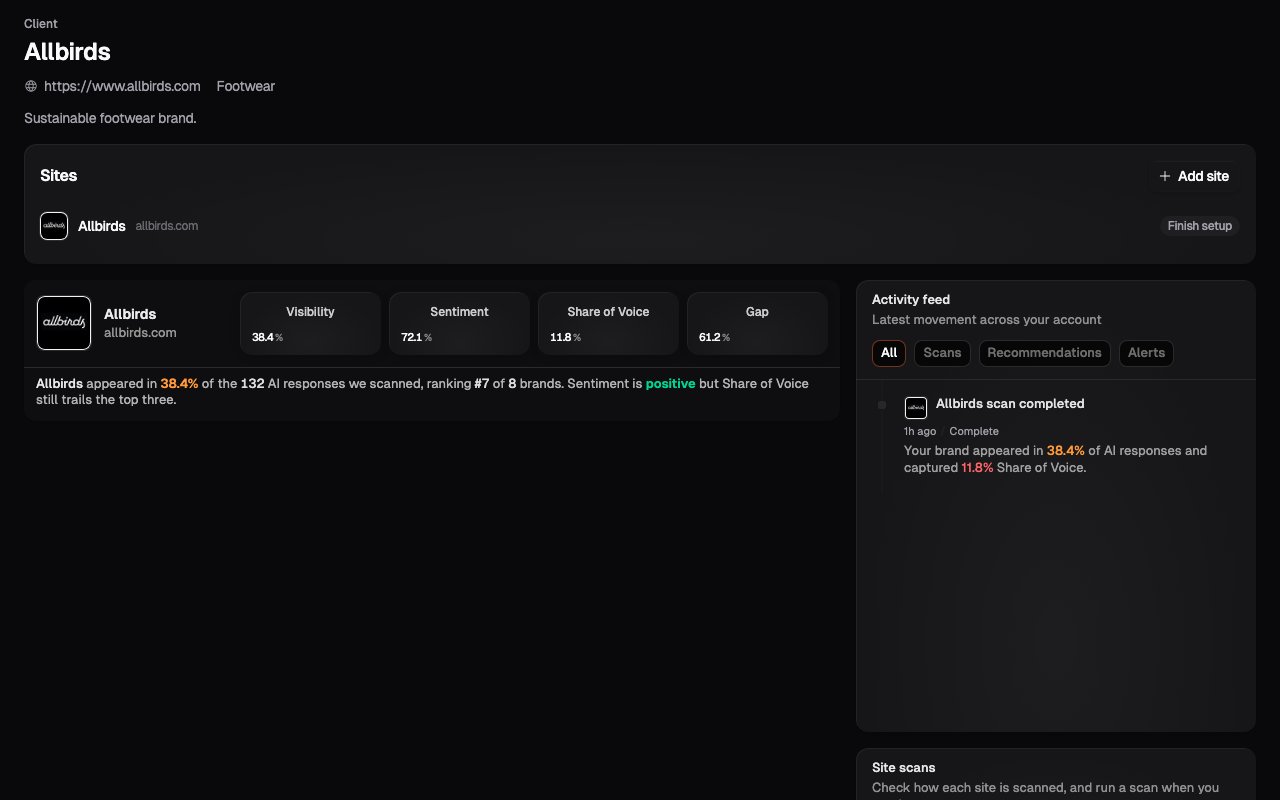
Every client in your portfolio has a **workspace**: the home for everything about that client. Open a client from the portfolio and you're in their world: their Sites, their scan status, their recent activity.
The workspace is what keeps a thirty-client portfolio manageable. Nothing from one client ever mixes with another, and everything you do for a client starts from their workspace.
 ## What's in the workspace
* **The client's Sites**: each with its headline numbers (Visibility, Share of Voice, Sentiment) so you can see how the client is doing without opening every dashboard
* **Recent activity**: completed scans and other events for this client
* **Add Site**: new Sites for this client are created here, not from the platform level
A brand-new client's workspace walks you straight into adding their first Site; see [Adding a client](/for-agencies/adding-a-client).
## Navigating client-first
The sidebar and breadcrumbs carry client context with you:
* At the **portfolio** level, the sidebar lists your clients.
* Inside a **client workspace**, the sidebar shows that client's Sites.
* Inside one of their **Sites**, you get the full site-level navigation (Insights, Scan Settings, Site Settings) exactly as a business account sees it, with the breadcrumb showing which client you're working in.
The pattern to remember: **portfolio → client → Site**. Everything drills down and the breadcrumb is always the way back up.
## Multi-brand clients
A client with several brands or websites gets several Sites inside the one workspace. The rule is the same as everywhere in Onsomble: one website or brand, one Site. The workspace keeps them grouped under the client while their scan data stays cleanly separated.
## What's next
The site creation flow you'll run inside each client's workspace.
Triage across all your clients at once.
## What's in the workspace
* **The client's Sites**: each with its headline numbers (Visibility, Share of Voice, Sentiment) so you can see how the client is doing without opening every dashboard
* **Recent activity**: completed scans and other events for this client
* **Add Site**: new Sites for this client are created here, not from the platform level
A brand-new client's workspace walks you straight into adding their first Site; see [Adding a client](/for-agencies/adding-a-client).
## Navigating client-first
The sidebar and breadcrumbs carry client context with you:
* At the **portfolio** level, the sidebar lists your clients.
* Inside a **client workspace**, the sidebar shows that client's Sites.
* Inside one of their **Sites**, you get the full site-level navigation (Insights, Scan Settings, Site Settings) exactly as a business account sees it, with the breadcrumb showing which client you're working in.
The pattern to remember: **portfolio → client → Site**. Everything drills down and the breadcrumb is always the way back up.
## Multi-brand clients
A client with several brands or websites gets several Sites inside the one workspace. The rule is the same as everywhere in Onsomble: one website or brand, one Site. The workspace keeps them grouped under the client while their scan data stays cleanly separated.
## What's next
The site creation flow you'll run inside each client's workspace.
Triage across all your clients at once.