> ## Documentation Index
> Fetch the complete documentation index at: https://docs.onsomble.ai/llms.txt
> Use this file to discover all available pages before exploring further.
# Review prompt coverage
> Use Matrix view to find meaningful gaps across Personas, journey stages, Products, regions, and prompt categories.
Matrix view turns your Prompt Library into a coverage map. Personas appear in rows, and you choose what the columns compare. Use the matrix to find customer situations worth measuring, not to fill every possible combination.
## Open Matrix view
Under **Scan Settings**, select **Prompt Library**. The library opens in
List view.
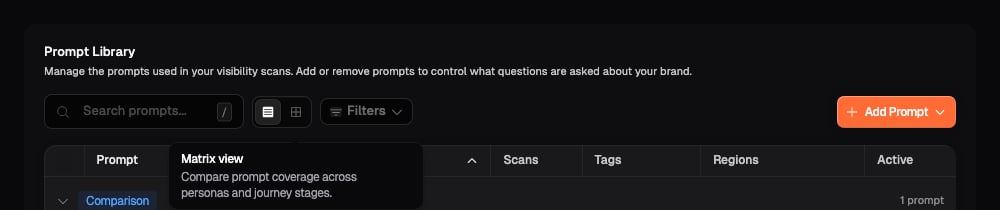
Look immediately to the right of **Search prompts**. The first icon shows
**List view** and the grid icon shows **Matrix view**. Hover over either
icon to see its name.
Select the grid icon labelled **Matrix view**. The prompt table changes to
a grid, and the highlighted grid icon confirms that Matrix view is active.
 ## Choose what the columns compare
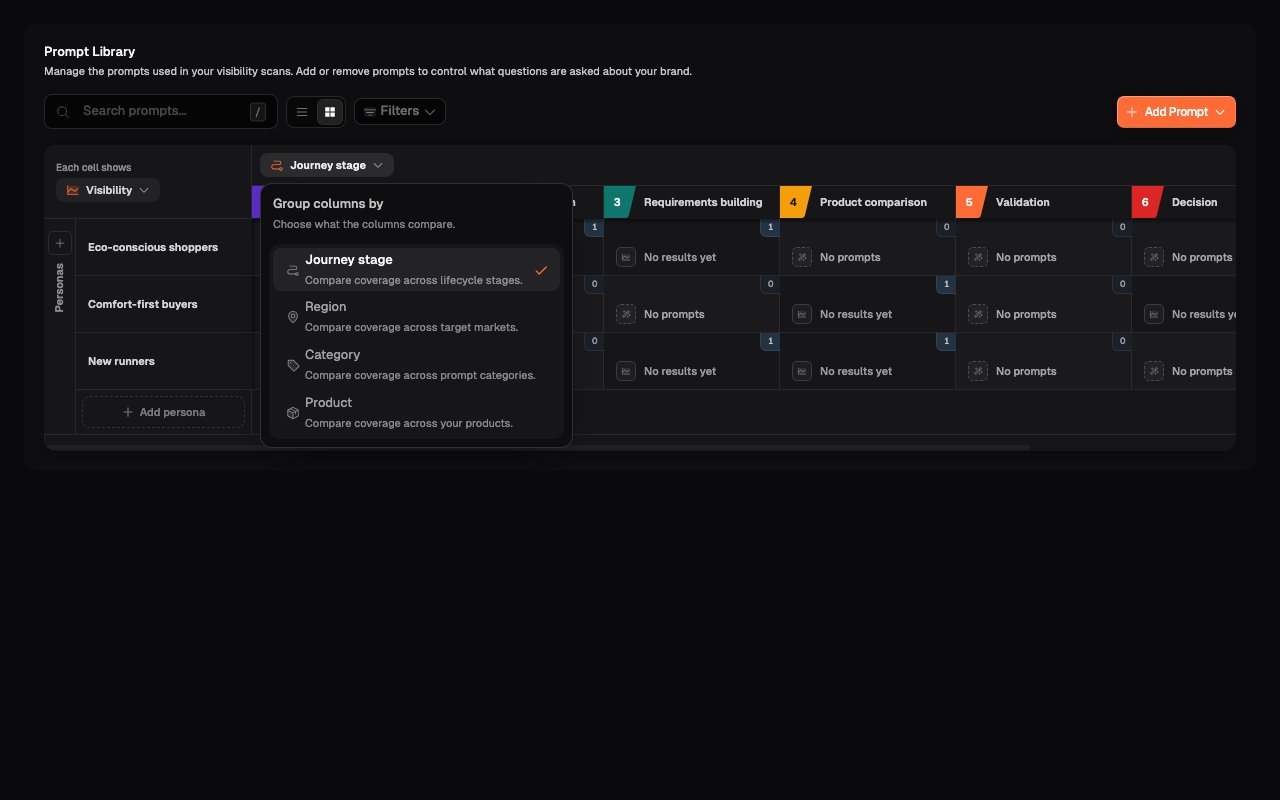
Personas always appear in rows. Use the selector above the columns to compare each Persona with a different part of your prompt framework.
Select the current column name, such as **Journey stage**.
Select **Journey stage**, **Region**, **Category**, or **Product**. The
columns change immediately, but the prompts in your library are not
edited.
Scroll horizontally when the selected grouping contains more columns than
the matrix can show at once.
## Choose what the columns compare
Personas always appear in rows. Use the selector above the columns to compare each Persona with a different part of your prompt framework.
Select the current column name, such as **Journey stage**.
Select **Journey stage**, **Region**, **Category**, or **Product**. The
columns change immediately, but the prompts in your library are not
edited.
Scroll horizontally when the selected grouping contains more columns than
the matrix can show at once.
 | Column grouping | Use it to ask |
| - | - |
| **Journey stage** | Are important Personas represented across the decisions that matter? |
| **Product** | Does each priority offering have relevant customer coverage? |
| **Region** | Are market-specific questions represented where location changes the answer? |
| **Category** | Does the set include an appropriate mix of Comparison, Recommendation, Specific, and General questions? |
**Region** or **Product** is unavailable when none has been configured for the Site. Add the missing detail before using that grouping.
Balanced coverage does not mean every cell contains the same number of prompts. Give more attention to the intersections supported by your measurement objective and customer evidence.
## Read a matrix cell
Each cell joins one Persona with one column value, such as **Comfort-first buyers × Product comparison**.
| Column grouping | Use it to ask |
| - | - |
| **Journey stage** | Are important Personas represented across the decisions that matter? |
| **Product** | Does each priority offering have relevant customer coverage? |
| **Region** | Are market-specific questions represented where location changes the answer? |
| **Category** | Does the set include an appropriate mix of Comparison, Recommendation, Specific, and General questions? |
**Region** or **Product** is unavailable when none has been configured for the Site. Add the missing detail before using that grouping.
Balanced coverage does not mean every cell contains the same number of prompts. Give more attention to the intersections supported by your measurement objective and customer evidence.
## Read a matrix cell
Each cell joins one Persona with one column value, such as **Comfort-first buyers × Product comparison**.
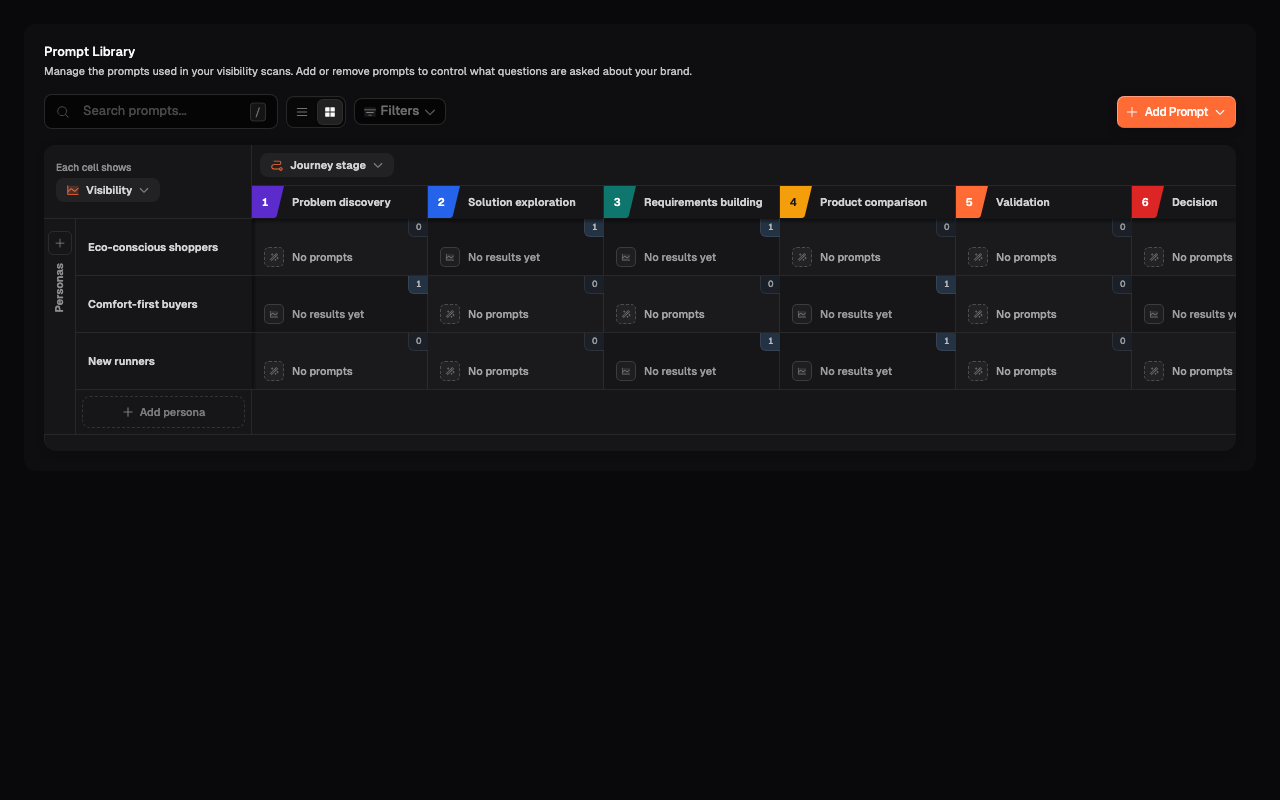 Read the two parts of each cell separately:
* The small badge in the top-right corner is the number of prompts in that intersection for the current search and filters.
* The main reading shows the result selected under **Each cell shows**. Before scan results are available, it explains why no result is shown.
| Cell reading | What it means |
| - | - |
| **No prompts** | No prompt in the current view matches that Persona and column value. |
| **No results yet** | At least one prompt is assigned to the intersection, but completed scan results are not available yet. |
| **0% Visibility** | The prompts have results, but your brand was not mentioned in the evaluated answers. This is a measured result, not an empty coverage gap. |
| A metric value or list | Results are available for the reading selected under **Each cell shows**. |
## Inspect the prompts in an intersection
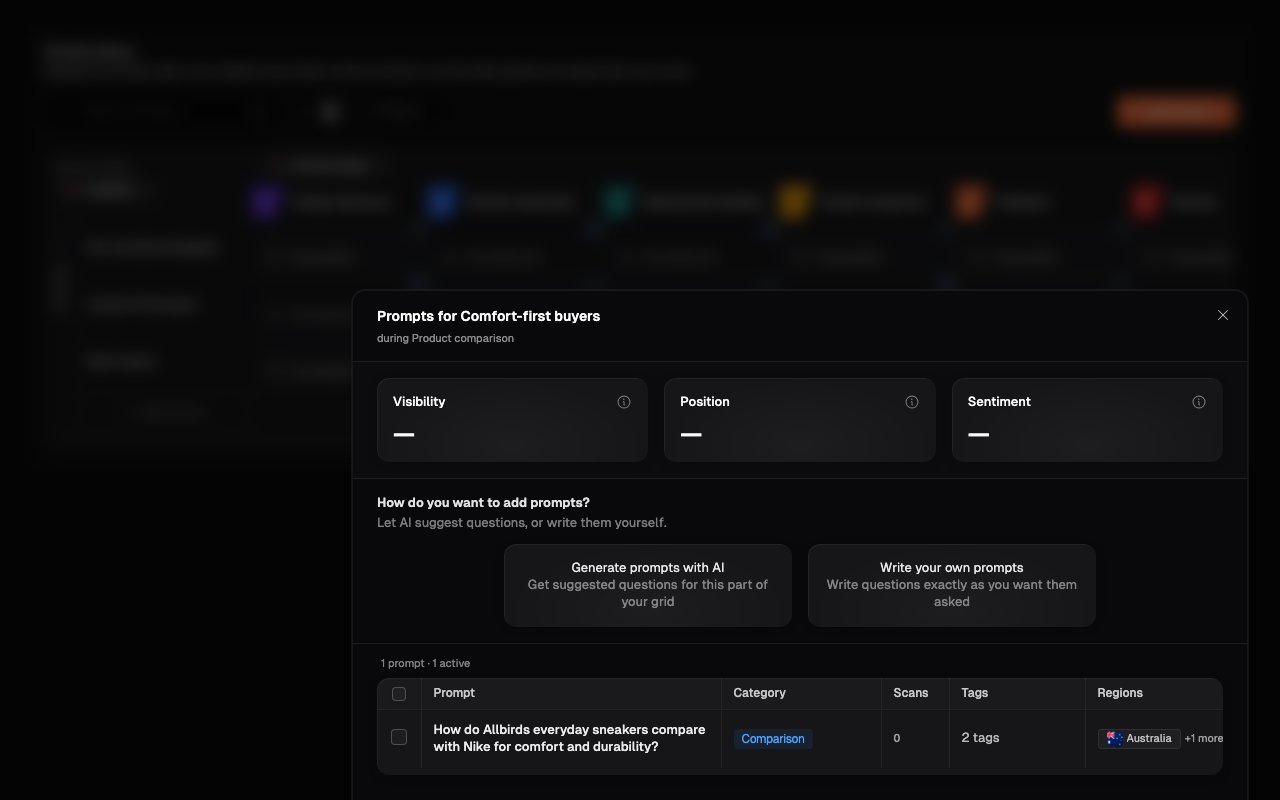
Open a populated cell before deciding that it needs more coverage. The intersection dialog shows the exact prompts behind the count and result.
Select a cell with one or more prompts.
Check the dialog heading and subtitle. They identify the Persona and column
value you selected.
Read the wording and review the Category, Tags, Regions, and scan count.
Check whether the existing prompts already represent the customer intent
you want to measure.
Select the close icon when you have finished reviewing the intersection.
Read the two parts of each cell separately:
* The small badge in the top-right corner is the number of prompts in that intersection for the current search and filters.
* The main reading shows the result selected under **Each cell shows**. Before scan results are available, it explains why no result is shown.
| Cell reading | What it means |
| - | - |
| **No prompts** | No prompt in the current view matches that Persona and column value. |
| **No results yet** | At least one prompt is assigned to the intersection, but completed scan results are not available yet. |
| **0% Visibility** | The prompts have results, but your brand was not mentioned in the evaluated answers. This is a measured result, not an empty coverage gap. |
| A metric value or list | Results are available for the reading selected under **Each cell shows**. |
## Inspect the prompts in an intersection
Open a populated cell before deciding that it needs more coverage. The intersection dialog shows the exact prompts behind the count and result.
Select a cell with one or more prompts.
Check the dialog heading and subtitle. They identify the Persona and column
value you selected.
Read the wording and review the Category, Tags, Regions, and scan count.
Check whether the existing prompts already represent the customer intent
you want to measure.
Select the close icon when you have finished reviewing the intersection.
 ## Decide whether an empty cell is a gap
**No prompts** describes the current view. Search text and filters can remove prompts from the matrix, so clear them before making a judgement about the complete library.
Then ask:
1. Would this Persona realistically have this need?
2. Would the selected Product, journey stage, or region materially change the question or answer?
3. Is the situation important enough to measure across future scans?
4. Does another prompt already cover the same customer intent under a different label?
Add a prompt when the intersection represents a distinct and useful customer question. Leave it empty when the combination is irrelevant or would only repeat existing coverage.
## Review unassigned prompts
A prompt cannot appear in the expected cell when it is missing a Persona or the detail currently used for the columns. Matrix view collects these prompts under **Unassigned** below the grid.
## Decide whether an empty cell is a gap
**No prompts** describes the current view. Search text and filters can remove prompts from the matrix, so clear them before making a judgement about the complete library.
Then ask:
1. Would this Persona realistically have this need?
2. Would the selected Product, journey stage, or region materially change the question or answer?
3. Is the situation important enough to measure across future scans?
4. Does another prompt already cover the same customer intent under a different label?
Add a prompt when the intersection represents a distinct and useful customer question. Leave it empty when the combination is irrelevant or would only repeat existing coverage.
## Review unassigned prompts
A prompt cannot appear in the expected cell when it is missing a Persona or the detail currently used for the columns. Matrix view collects these prompts under **Unassigned** below the grid.
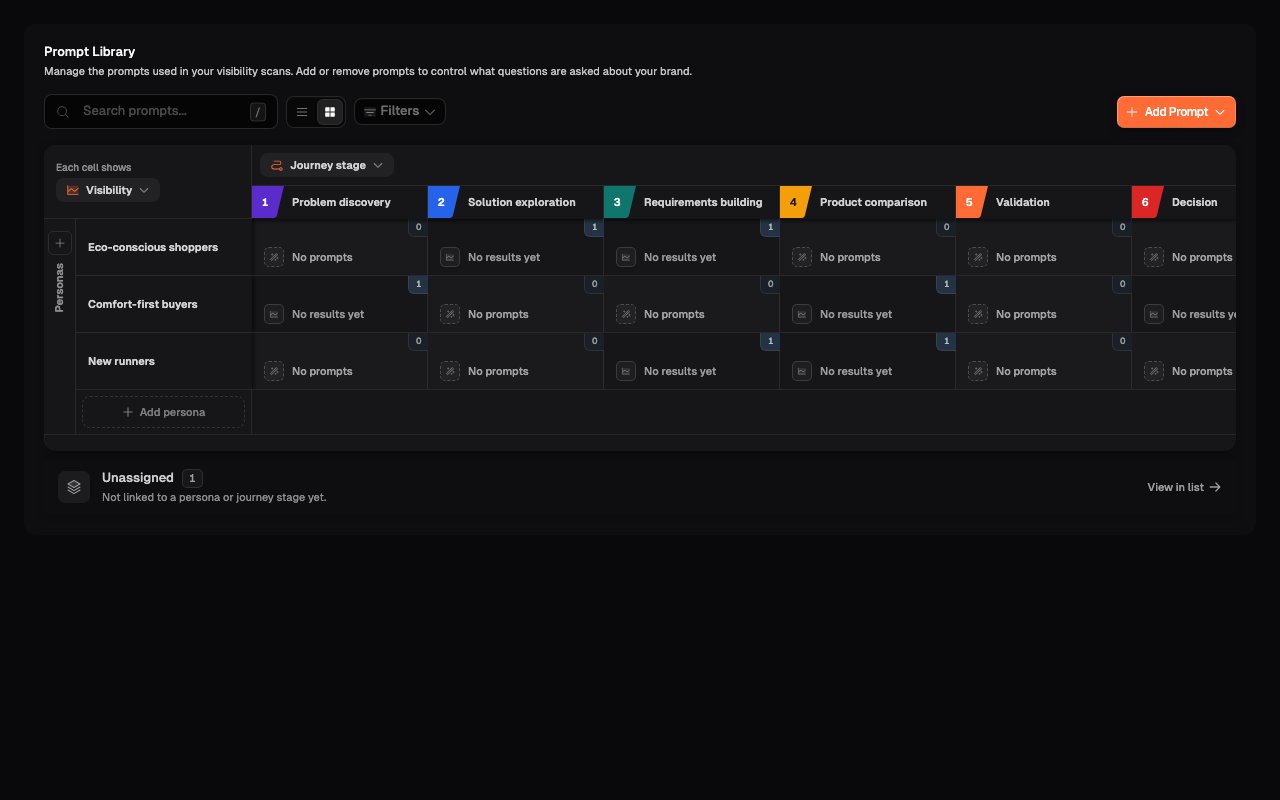 Select **View in list** to open the affected prompts in List view. Add the missing Persona or column detail, then return to Matrix view and check that the prompt appears in the intended intersection.
Review unassigned prompts before treating an empty cell as a genuine gap. The prompt may already exist but lack the details needed to place it on the matrix.
## Review results after scans
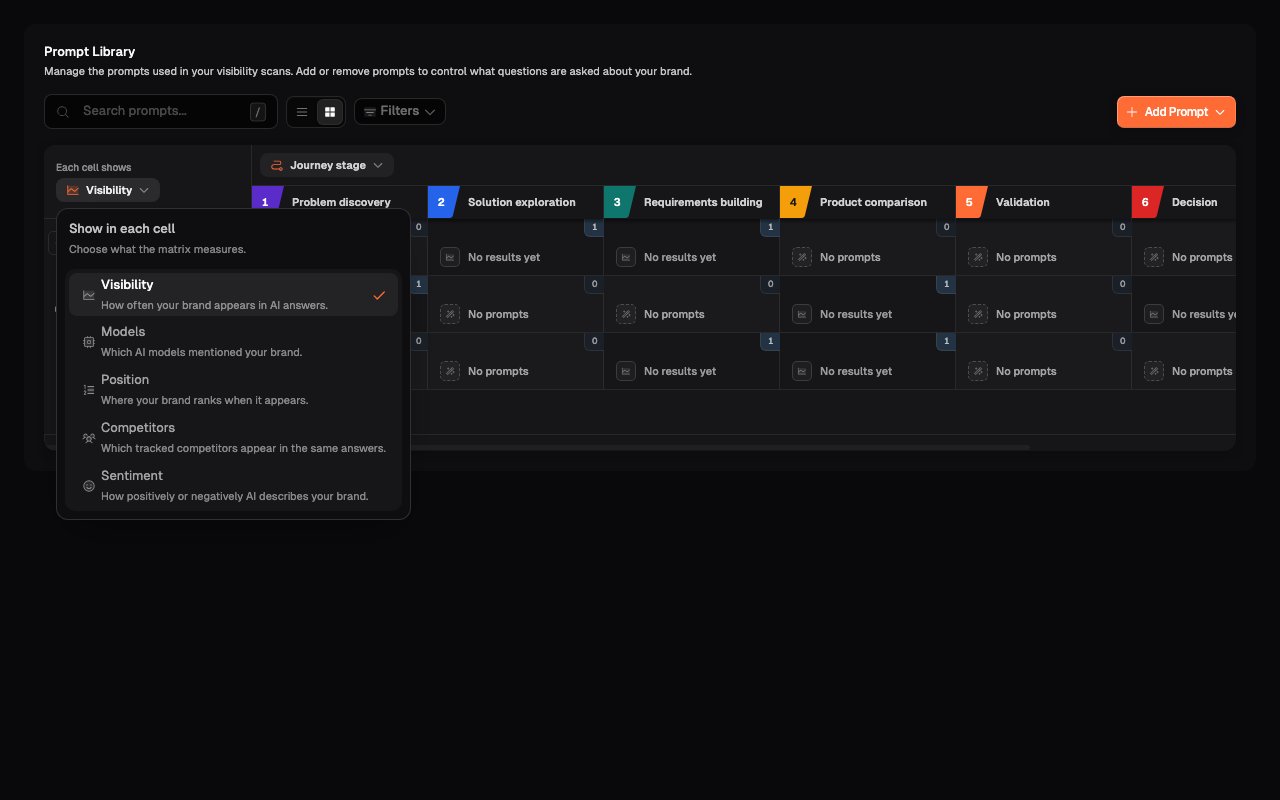
After prompts have run, use **Each cell shows** in the top-left corner of the matrix to change the main reading in every cell.
Select **View in list** to open the affected prompts in List view. Add the missing Persona or column detail, then return to Matrix view and check that the prompt appears in the intended intersection.
Review unassigned prompts before treating an empty cell as a genuine gap. The prompt may already exist but lack the details needed to place it on the matrix.
## Review results after scans
After prompts have run, use **Each cell shows** in the top-left corner of the matrix to change the main reading in every cell.
 | Reading | What it shows for the intersection |
| - | - |
| **Visibility** | The share of evaluated answers that mention your brand. |
| **Models** | The AI assistants that mentioned your brand. It does not list every assistant that ran the prompts. |
| **Position** | Your brand's average position when it appeared. A lower number means an earlier position. |
| **Competitors** | Tracked competitors mentioned in the same answers. |
| **Sentiment** | How positively or negatively your brand was described. |
Changing this control changes the main reading, not the prompts or the prompt-count badge. Use the result to choose an intersection to investigate, then inspect its prompts and scan responses. A weak result identifies where to look; it does not explain the cause by itself.
Compare intersections carefully when they contain very different numbers of prompts or evaluated answers.
## Complete the review
Your review is complete when:
* important customer situations are represented;
* deliberately empty intersections have a clear reason;
* search and filters are cleared for the final library-wide check;
* unassigned prompts have been resolved or deliberately left unassigned;
* repeated wording does not inflate the apparent coverage; and
* you know which gaps need a new prompt and which should remain empty.
## What's next
Add prompts to an intersection and maintain the Personas and Products that shape the grid.
Search, filter, update, deactivate, and remove prompts in List view.
This documentation is built and hosted on [Mintlify](https://mintlify.com), a developer documentation platform.
| Reading | What it shows for the intersection |
| - | - |
| **Visibility** | The share of evaluated answers that mention your brand. |
| **Models** | The AI assistants that mentioned your brand. It does not list every assistant that ran the prompts. |
| **Position** | Your brand's average position when it appeared. A lower number means an earlier position. |
| **Competitors** | Tracked competitors mentioned in the same answers. |
| **Sentiment** | How positively or negatively your brand was described. |
Changing this control changes the main reading, not the prompts or the prompt-count badge. Use the result to choose an intersection to investigate, then inspect its prompts and scan responses. A weak result identifies where to look; it does not explain the cause by itself.
Compare intersections carefully when they contain very different numbers of prompts or evaluated answers.
## Complete the review
Your review is complete when:
* important customer situations are represented;
* deliberately empty intersections have a clear reason;
* search and filters are cleared for the final library-wide check;
* unassigned prompts have been resolved or deliberately left unassigned;
* repeated wording does not inflate the apparent coverage; and
* you know which gaps need a new prompt and which should remain empty.
## What's next
Add prompts to an intersection and maintain the Personas and Products that shape the grid.
Search, filter, update, deactivate, and remove prompts in List view.
This documentation is built and hosted on [Mintlify](https://mintlify.com), a developer documentation platform.