> ## Documentation Index
> Fetch the complete documentation index at: https://docs.onsomble.ai/llms.txt
> Use this file to discover all available pages before exploring further.
# Narrative
> Understand the strengths, concerns, and decision factors AI assistants associate with your brand and competitors.
The headline metrics tell you how often and how positively your business appeared. **Narrative** shows the ideas behind those numbers: the features, trust signals, decision factors, and concerns found across the measured AI answers.
Use this page when you want to understand questions such as:
* Why is our Sentiment score high or low?
* Which strengths do AI assistants associate with us?
* Which customer concerns keep appearing?
* What are competitors known for that we are not?
 ## What an attribute represents
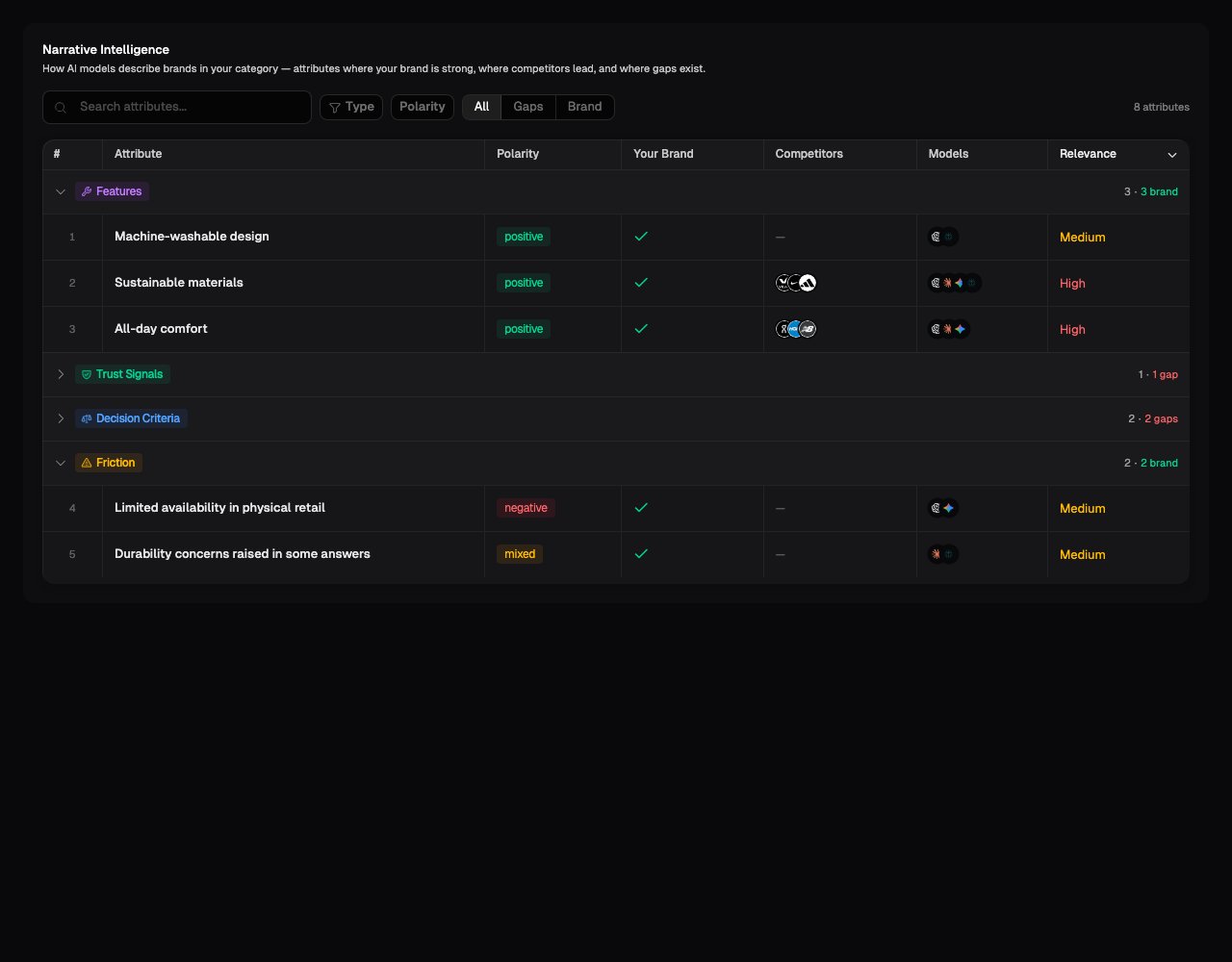
Each row is an attribute or theme found in one or more measured responses. Onsomble groups attributes into four types:
* **Feature**: a product, service, or capability associated with a brand
* **Trust Signal**: evidence that may build confidence, such as reviews, credentials, experience, or track record
* **Decision Criteria**: something an AI assistant treats as important when comparing or recommending businesses in the category
* **Friction**: a concern, drawback, or hesitation associated with a brand
These types describe the role an attribute plays. They do not tell you whether the attribute is favourable. Use **Polarity** for that.
## How to read each row
* **Attribute**: the idea detected in the measured answers
* **Polarity**: whether the attribute was described positively, negatively, neutrally, or in a mixture of ways
* **Your Brand**: whether the attribute was associated with your business
* **Competitors**: tracked competitors associated with the same attribute
* **Models**: the AI assistants whose responses contained the attribute
* **Relevance**: Onsomble's estimate of how important the attribute is within the measured category narrative, shown as High, Medium, or Low
Relevance is an importance estimate, not a count of how many times an exact
phrase appeared. Open an attribute to inspect the supporting responses before
deciding how much weight to give it.
## Brand, Gaps, and All views
The view selector answers a different question from the attribute type:
* **All** shows every detected attribute.
* **Brand** shows attributes associated with your business.
* **Gaps** shows attributes present in the market or competitor narrative but not associated with your business in the selected results.
A gap does not automatically mean your business lacks the capability. It means the measured answers did not connect that attribute with your brand. Check whether the association is missing from your public content, absent from the selected prompts, or simply not present in this scan.
## Inspect the evidence
Select an attribute to open its detail panel. The evidence shows the model, prompt, brand association, and response text behind the row.
Check the evidence when:
* the wording looks surprising or too broad
* positive and negative descriptions were combined into **Mixed**
* an important attribute appears as a gap
* only one model expressed the attribute
* you want a concrete example for a client or internal report
## What to look for
* **Repeated negative friction linked to your brand.** Confirm the wording and source before deciding whether the issue is inaccurate information, unclear positioning, or a real customer concern.
* **Trust signals associated with competitors but not you.** Check whether the proof exists but is poorly communicated, or whether the business needs to build it.
* **High-relevance decision criteria missing from your brand.** These show what the measured answers considered important when recommending in the category.
* **Different descriptions across models.** Filter by model to see whether a narrative is widespread or isolated to one assistant.
## What Narrative cannot prove
Narrative attributes are interpretations of the measured AI responses. They do not prove what every customer believes, that an attribute is factually correct, or that publishing one page will change future answers. Use the evidence to form a hypothesis, then check your source content and later scans.
## What's next
Read the complete answers behind an attribute or gap.
See which websites and pages appeared alongside the measured answers.
Review suggested actions connected to the scan evidence.
Narrow the narrative by model, market, product, or prompt group.
## What an attribute represents
Each row is an attribute or theme found in one or more measured responses. Onsomble groups attributes into four types:
* **Feature**: a product, service, or capability associated with a brand
* **Trust Signal**: evidence that may build confidence, such as reviews, credentials, experience, or track record
* **Decision Criteria**: something an AI assistant treats as important when comparing or recommending businesses in the category
* **Friction**: a concern, drawback, or hesitation associated with a brand
These types describe the role an attribute plays. They do not tell you whether the attribute is favourable. Use **Polarity** for that.
## How to read each row
* **Attribute**: the idea detected in the measured answers
* **Polarity**: whether the attribute was described positively, negatively, neutrally, or in a mixture of ways
* **Your Brand**: whether the attribute was associated with your business
* **Competitors**: tracked competitors associated with the same attribute
* **Models**: the AI assistants whose responses contained the attribute
* **Relevance**: Onsomble's estimate of how important the attribute is within the measured category narrative, shown as High, Medium, or Low
Relevance is an importance estimate, not a count of how many times an exact
phrase appeared. Open an attribute to inspect the supporting responses before
deciding how much weight to give it.
## Brand, Gaps, and All views
The view selector answers a different question from the attribute type:
* **All** shows every detected attribute.
* **Brand** shows attributes associated with your business.
* **Gaps** shows attributes present in the market or competitor narrative but not associated with your business in the selected results.
A gap does not automatically mean your business lacks the capability. It means the measured answers did not connect that attribute with your brand. Check whether the association is missing from your public content, absent from the selected prompts, or simply not present in this scan.
## Inspect the evidence
Select an attribute to open its detail panel. The evidence shows the model, prompt, brand association, and response text behind the row.
Check the evidence when:
* the wording looks surprising or too broad
* positive and negative descriptions were combined into **Mixed**
* an important attribute appears as a gap
* only one model expressed the attribute
* you want a concrete example for a client or internal report
## What to look for
* **Repeated negative friction linked to your brand.** Confirm the wording and source before deciding whether the issue is inaccurate information, unclear positioning, or a real customer concern.
* **Trust signals associated with competitors but not you.** Check whether the proof exists but is poorly communicated, or whether the business needs to build it.
* **High-relevance decision criteria missing from your brand.** These show what the measured answers considered important when recommending in the category.
* **Different descriptions across models.** Filter by model to see whether a narrative is widespread or isolated to one assistant.
## What Narrative cannot prove
Narrative attributes are interpretations of the measured AI responses. They do not prove what every customer believes, that an attribute is factually correct, or that publishing one page will change future answers. Use the evidence to form a hypothesis, then check your source content and later scans.
## What's next
Read the complete answers behind an attribute or gap.
See which websites and pages appeared alongside the measured answers.
Review suggested actions connected to the scan evidence.
Narrow the narrative by model, market, product, or prompt group.