> ## Documentation Index
> Fetch the complete documentation index at: https://docs.onsomble.ai/llms.txt
> Use this file to discover all available pages before exploring further.
# Recommendations
> Review suggested actions based on patterns found in your scan results.
**Recommendations** turns patterns found in a scan into suggested actions. Use the list as a starting point for investigation and planning, not as an automatic to-do list.
Recommendations can point to content gaps, technical improvements, search opportunities, or third-party signals. When supporting evidence is available, you can inspect the prompts and responses behind a suggestion before deciding whether it applies to your business.
 ## Read each recommendation
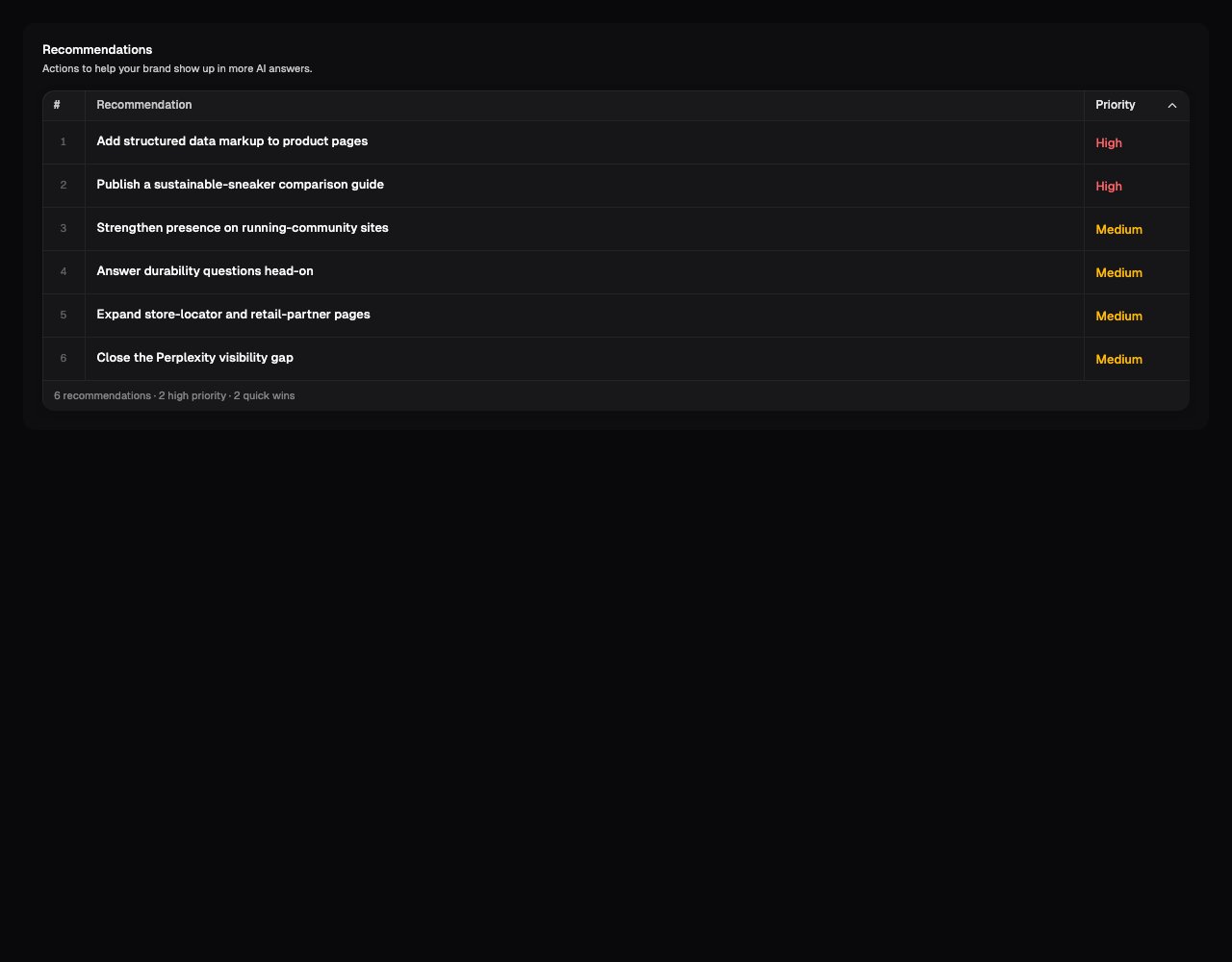
Each row in the list is one suggested action, with a priority next to it:
| Label | Possible values | What it tells you |
| ------------ | ----------------- | ---------------------------------------------------------------------------------------------------------------------------------- |
| **Priority** | High, Medium, Low | The estimated importance of the issue found in the scan. It does not account for all of your commercial priorities or constraints. |
## Open a recommendation to see the full picture
Click a row and a panel opens with everything behind that suggestion: what to build, why it matters, which questions it targets, and where AI assistants currently look for information instead. The panel also shows:
| Label | Possible values | What it tells you |
| -------------- | --------------------------------- | --------------------------------------------------------------------------------------------------- |
| **Category** | Content, SEO, Technical, Outreach | The kind of work the recommendation is likely to require. |
| **Effort** | Quick win, Medium, Strategic | A broad estimate of the work involved. Confirm the real effort with the people who will deliver it. |
| **Confidence** | High, Medium, Low | How strongly the evidence supports the suggestion. |
| **Impact** | High, Medium, Low | How much the change is likely to move your results if it works. |
## Read each recommendation
Each row in the list is one suggested action, with a priority next to it:
| Label | Possible values | What it tells you |
| ------------ | ----------------- | ---------------------------------------------------------------------------------------------------------------------------------- |
| **Priority** | High, Medium, Low | The estimated importance of the issue found in the scan. It does not account for all of your commercial priorities or constraints. |
## Open a recommendation to see the full picture
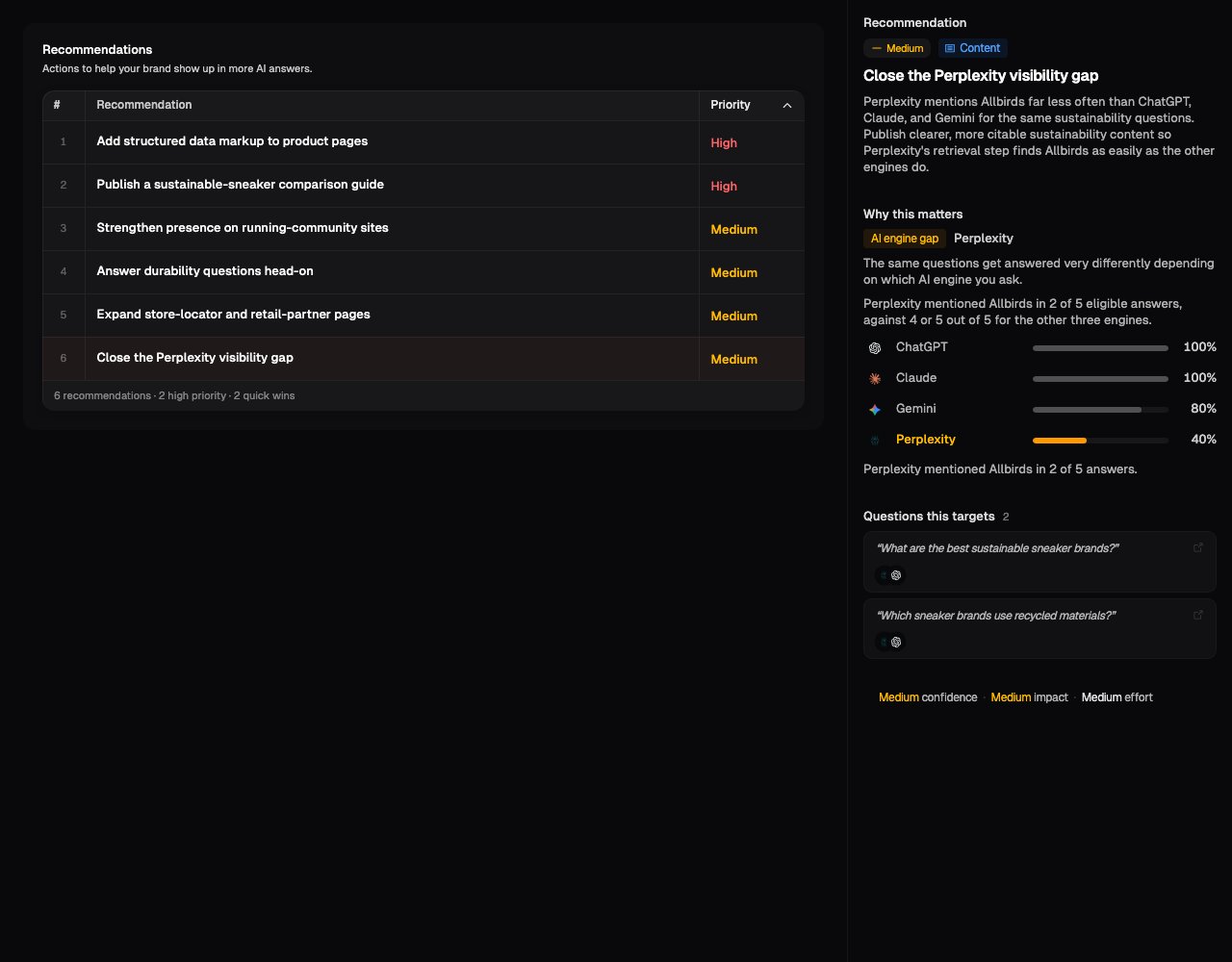
Click a row and a panel opens with everything behind that suggestion: what to build, why it matters, which questions it targets, and where AI assistants currently look for information instead. The panel also shows:
| Label | Possible values | What it tells you |
| -------------- | --------------------------------- | --------------------------------------------------------------------------------------------------- |
| **Category** | Content, SEO, Technical, Outreach | The kind of work the recommendation is likely to require. |
| **Effort** | Quick win, Medium, Strategic | A broad estimate of the work involved. Confirm the real effort with the people who will deliver it. |
| **Confidence** | High, Medium, Low | How strongly the evidence supports the suggestion. |
| **Impact** | High, Medium, Low | How much the change is likely to move your results if it works. |
 The categories cover:
* **Content:** Create or improve pages, articles, comparisons, and on-page explanations.
* **SEO:** Make content easier to discover and better aligned with relevant searches.
* **Technical:** Improve structure or implementation, such as structured data or page organisation.
* **Outreach:** Strengthen third-party signals through sources such as reviews, directories, publishers, or partners.
**Some recommendations compare AI assistants directly.** ChatGPT, Claude, Gemini, and Perplexity don't always agree: one assistant can mention your brand for a question while the others don't. When that's the pattern behind a recommendation, it's tagged **AI engine gap**, and the panel includes a small chart with one bar per assistant, showing how often each one mentions your brand for the same questions. The assistant that's falling behind is highlighted, so you can tell at a glance whether the problem is with one assistant or all of them.
Under each question a recommendation targets, small logos show which AI assistants that question came from, so you can see which ones raised the issue without opening every response.
## Check the evidence before acting
Open a recommendation to see its evidence, when evidence is available. Check:
1. which prompts and responses support the suggestion;
2. whether the pattern appears more than once;
3. whether the underlying claims are factually correct; and
4. whether the proposed action fits your audience, strategy, and publishing constraints.
Some recommendations from older scans may not include detailed evidence. In that case, use the recommendation as a lead and verify it in [Prompt Results](/results/prompt-results) before prioritising it.
Recommendations are AI-generated suggestions. They do not verify your legal,
brand, technical, or commercial requirements, and they do not guarantee that a
score will improve. Onsomble does not apply the suggested changes for you.
## Decide what to do first
A practical review order is:
1. **Correct factual problems.** Prioritise repeated inaccuracies about products, prices, locations, or capabilities.
2. **Review high-priority patterns.** Confirm that the evidence is strong and the affected prompts matter to the business.
3. **Balance impact and effort.** A quick win can be useful, but a larger strategic action may address more important gaps.
4. **Group related work.** Several recommendations may be symptoms of the same missing page, weak explanation, or source problem.
5. **Record the change.** Note what was changed and when, so later scans can be compared with it.
## Track what happens next
After making a change, compare the relevant prompts and metrics in later completed scans. Results may move at different times across models, and a change between scans does not by itself prove that your work caused it.
If the result does not improve, re-check the responses and references. The information may not have been picked up yet, the evidence may exist in conflicting sources, or the original recommendation may not have addressed the real issue.
## What's next
Verify the responses and prompts behind a recommendation.
Compare your metrics in later scans.
The categories cover:
* **Content:** Create or improve pages, articles, comparisons, and on-page explanations.
* **SEO:** Make content easier to discover and better aligned with relevant searches.
* **Technical:** Improve structure or implementation, such as structured data or page organisation.
* **Outreach:** Strengthen third-party signals through sources such as reviews, directories, publishers, or partners.
**Some recommendations compare AI assistants directly.** ChatGPT, Claude, Gemini, and Perplexity don't always agree: one assistant can mention your brand for a question while the others don't. When that's the pattern behind a recommendation, it's tagged **AI engine gap**, and the panel includes a small chart with one bar per assistant, showing how often each one mentions your brand for the same questions. The assistant that's falling behind is highlighted, so you can tell at a glance whether the problem is with one assistant or all of them.
Under each question a recommendation targets, small logos show which AI assistants that question came from, so you can see which ones raised the issue without opening every response.
## Check the evidence before acting
Open a recommendation to see its evidence, when evidence is available. Check:
1. which prompts and responses support the suggestion;
2. whether the pattern appears more than once;
3. whether the underlying claims are factually correct; and
4. whether the proposed action fits your audience, strategy, and publishing constraints.
Some recommendations from older scans may not include detailed evidence. In that case, use the recommendation as a lead and verify it in [Prompt Results](/results/prompt-results) before prioritising it.
Recommendations are AI-generated suggestions. They do not verify your legal,
brand, technical, or commercial requirements, and they do not guarantee that a
score will improve. Onsomble does not apply the suggested changes for you.
## Decide what to do first
A practical review order is:
1. **Correct factual problems.** Prioritise repeated inaccuracies about products, prices, locations, or capabilities.
2. **Review high-priority patterns.** Confirm that the evidence is strong and the affected prompts matter to the business.
3. **Balance impact and effort.** A quick win can be useful, but a larger strategic action may address more important gaps.
4. **Group related work.** Several recommendations may be symptoms of the same missing page, weak explanation, or source problem.
5. **Record the change.** Note what was changed and when, so later scans can be compared with it.
## Track what happens next
After making a change, compare the relevant prompts and metrics in later completed scans. Results may move at different times across models, and a change between scans does not by itself prove that your work caused it.
If the result does not improve, re-check the responses and references. The information may not have been picked up yet, the evidence may exist in conflicting sources, or the original recommendation may not have addressed the real issue.
## What's next
Verify the responses and prompts behind a recommendation.
Compare your metrics in later scans.