> ## Documentation Index
> Fetch the complete documentation index at: https://docs.onsomble.ai/llms.txt
> Use this file to discover all available pages before exploring further.
# Recommendations
> What recommendations are, how they are made, and how to read them before you act.
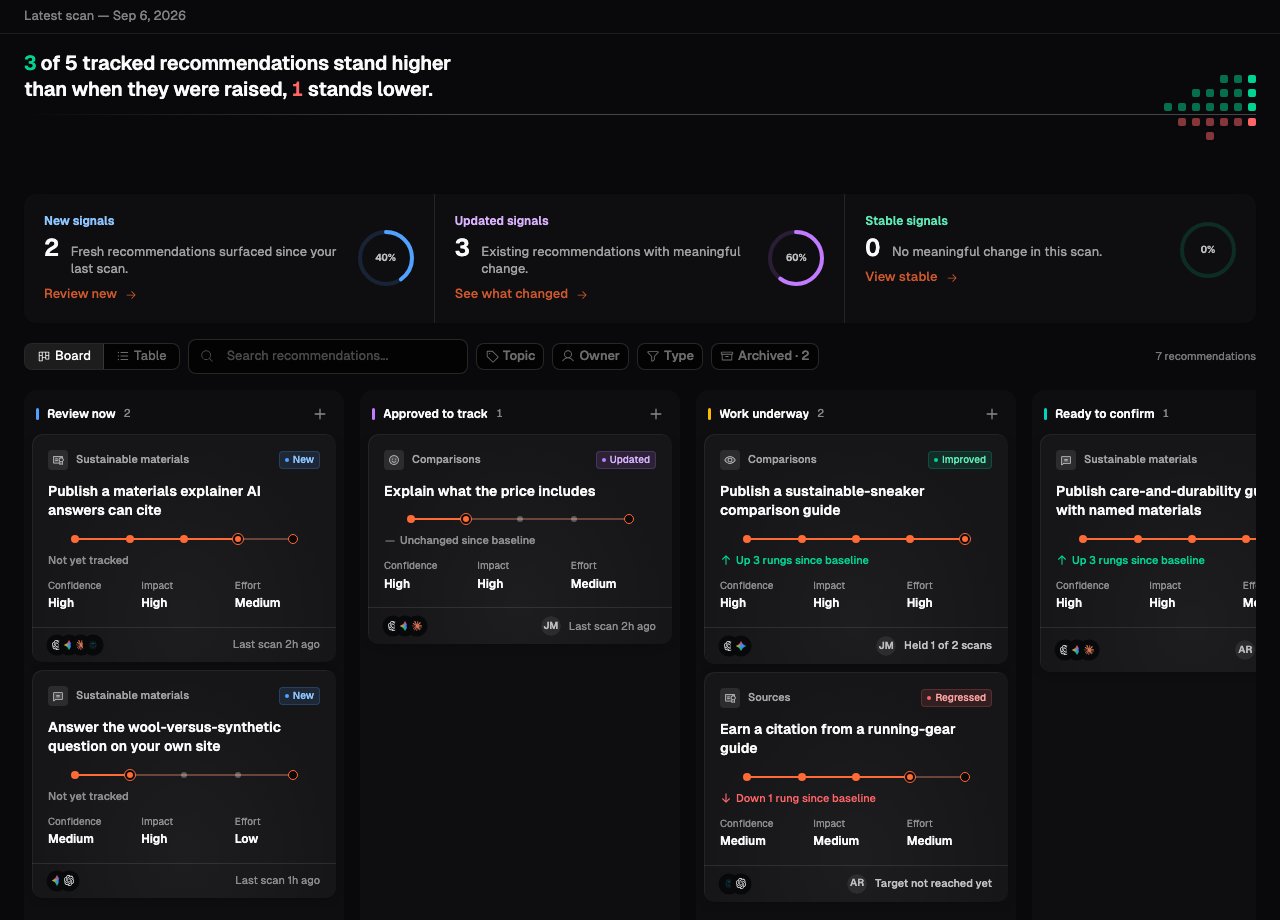
**Recommendations** turn the evidence in a scan into a short list of actions that could help your brand show up, and show up well, in AI answers. Each one starts from a real question buyers ask, what the AI assistants said in reply, and where your brand fell short.
Recommendations are a starting point for planning, not an automatic to-do list. They are AI-generated leads: worth reviewing, worth checking against your own strategy, and only worth doing when the evidence and the effort stack up.
 ## How a recommendation is made
Every scan asks your prompts across the AI assistants you selected. When the answers show a repeatable gap, Onsomble writes a recommendation for it. A recommendation always carries:
* **The buyer question** an assistant was asked.
* **What the answers said** about your brand on that question.
* **What was missing**, in plain words: why your brand did not stand higher.
* **A proposed action** and a measurable test the next scans can check.
Because each one is tied to scan evidence, you can inspect the prompts and responses behind it before deciding whether it applies to your business.
## How to read a recommendation
Read a recommendation as a hypothesis with evidence attached, not an instruction. Three habits keep them useful:
Open the recommendation and check the answers behind it. Does the gap appear
more than once? Are the underlying claims about your brand accurate?
A quick change that moves an important question can beat a large project
that moves a minor one. The confidence, impact and effort labels are
estimates to compare with, not guarantees.
Only you know your audience, your roadmap and your constraints. Keep the
recommendations that fit and dismiss the ones that do not.
Recommendations are AI-generated suggestions. They do not verify your legal,
brand, technical, or commercial requirements, and they do not guarantee that
your standing will improve. Onsomble does not make the changes for you.
## The three parts of the feature
Recommendations are more than a list. They move through a workflow you manage, and once you start tracking one, later scans measure whether it worked.
Every recommendation sits in a column that reflects its status, from Review
now through to Proven. Move a card to change where it stands.
The brief: the buyer question, what AI answers say, what is holding you
back, and the proposed work with its measurable test.
Once you approve one, each scan re-reads where you stand and shows whether
the work moved your standing.
This documentation is built and hosted on [Mintlify](https://mintlify.com), a developer documentation platform.
## How a recommendation is made
Every scan asks your prompts across the AI assistants you selected. When the answers show a repeatable gap, Onsomble writes a recommendation for it. A recommendation always carries:
* **The buyer question** an assistant was asked.
* **What the answers said** about your brand on that question.
* **What was missing**, in plain words: why your brand did not stand higher.
* **A proposed action** and a measurable test the next scans can check.
Because each one is tied to scan evidence, you can inspect the prompts and responses behind it before deciding whether it applies to your business.
## How to read a recommendation
Read a recommendation as a hypothesis with evidence attached, not an instruction. Three habits keep them useful:
Open the recommendation and check the answers behind it. Does the gap appear
more than once? Are the underlying claims about your brand accurate?
A quick change that moves an important question can beat a large project
that moves a minor one. The confidence, impact and effort labels are
estimates to compare with, not guarantees.
Only you know your audience, your roadmap and your constraints. Keep the
recommendations that fit and dismiss the ones that do not.
Recommendations are AI-generated suggestions. They do not verify your legal,
brand, technical, or commercial requirements, and they do not guarantee that
your standing will improve. Onsomble does not make the changes for you.
## The three parts of the feature
Recommendations are more than a list. They move through a workflow you manage, and once you start tracking one, later scans measure whether it worked.
Every recommendation sits in a column that reflects its status, from Review
now through to Proven. Move a card to change where it stands.
The brief: the buyer question, what AI answers say, what is holding you
back, and the proposed work with its measurable test.
Once you approve one, each scan re-reads where you stand and shows whether
the work moved your standing.
This documentation is built and hosted on [Mintlify](https://mintlify.com), a developer documentation platform.