> ## Documentation Index
> Fetch the complete documentation index at: https://docs.onsomble.ai/llms.txt
> Use this file to discover all available pages before exploring further.
# Reading a recommendation
> The brief behind a recommendation: the buyer question, the answers, the shortfall, the proposed work, and the evidence.
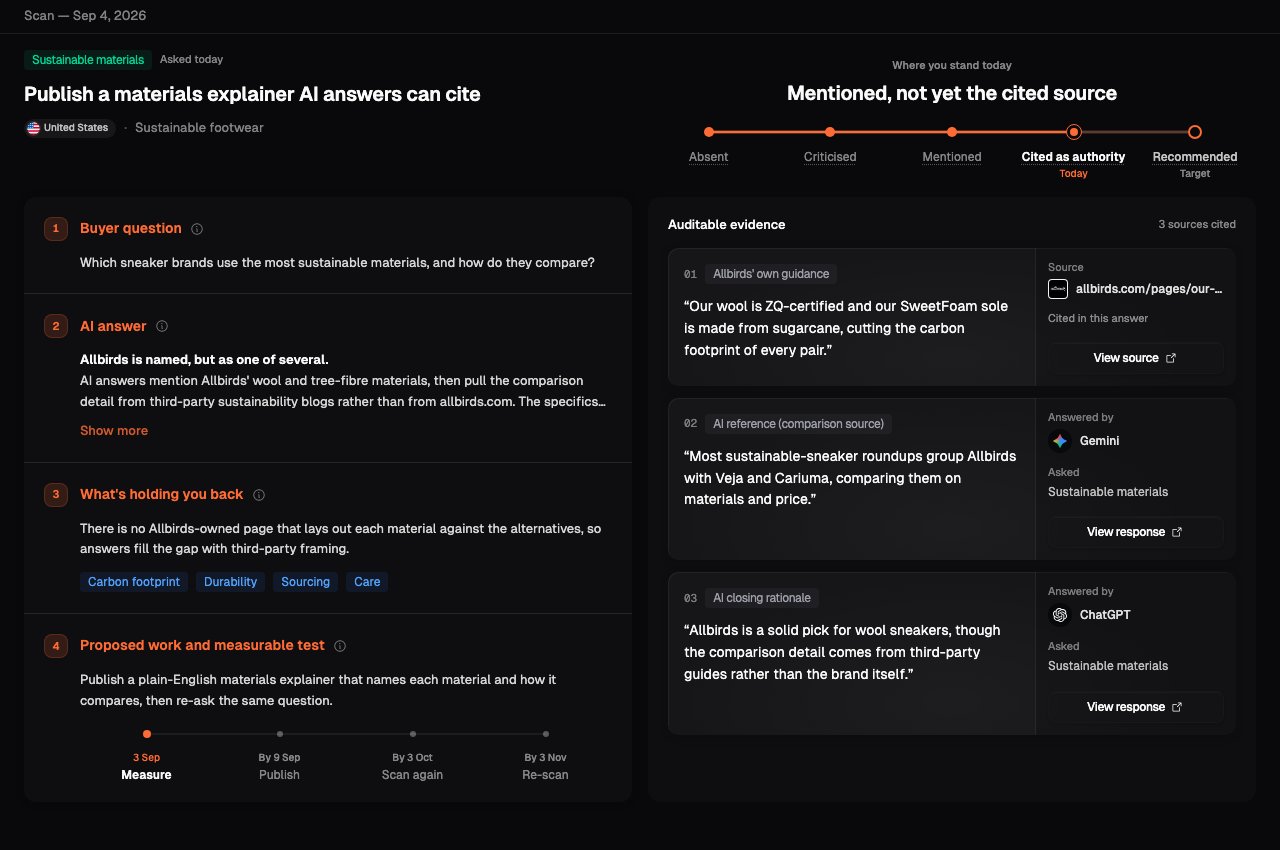
Open a card and its **brief** explains, in plain words, why the recommendation exists and what to do about it. Everything on the page traces back to a real answer from your last scan, so you can judge the recommendation on evidence rather than take it on trust.
 ## Where you stand today
At the top, a ladder shows how AI answers currently treat your brand on this question, from **Absent** through **Criticised**, **Mentioned** and **Cited as authority** to **Recommended**. Your position today is marked, and so is the target the recommendation is aiming for.
## The four parts of the brief
The question an AI assistant was asked. This is what a potential customer
might type, not an internal metric.
What the assistants said about your brand on that question today, summarised
in plain words.
Why your standing is not higher, and what the answers would need to see to
move it. When specific factors are missing, they are listed here.
The action to take, and a short plan the next scans can check: what to
measure, what to publish, and when to scan again.
## Check the evidence
The brief lists the sources behind your current standing: your own pages that AI answers cite, and the assistant answers themselves. Each source is labelled and quoted, so you can open it and confirm the pattern before you act.
See which of your pages, and which assistant answers, shaped the standing.
Open a source to read it in full.
Check that the gap shows up in more than one answer, and that the claims
about your brand are accurate.
Some recommendations from older scans carry less evidence. Use the
recommendation as a lead and confirm it in [Prompt
Results](/results/prompt-results) before you prioritise it.
## What's next
Approve a recommendation and follow how your standing moves across scans.
Read the responses and prompts behind a recommendation, engine by engine.
This documentation is built and hosted on [Mintlify](https://mintlify.com), a developer documentation platform.
## Where you stand today
At the top, a ladder shows how AI answers currently treat your brand on this question, from **Absent** through **Criticised**, **Mentioned** and **Cited as authority** to **Recommended**. Your position today is marked, and so is the target the recommendation is aiming for.
## The four parts of the brief
The question an AI assistant was asked. This is what a potential customer
might type, not an internal metric.
What the assistants said about your brand on that question today, summarised
in plain words.
Why your standing is not higher, and what the answers would need to see to
move it. When specific factors are missing, they are listed here.
The action to take, and a short plan the next scans can check: what to
measure, what to publish, and when to scan again.
## Check the evidence
The brief lists the sources behind your current standing: your own pages that AI answers cite, and the assistant answers themselves. Each source is labelled and quoted, so you can open it and confirm the pattern before you act.
See which of your pages, and which assistant answers, shaped the standing.
Open a source to read it in full.
Check that the gap shows up in more than one answer, and that the claims
about your brand are accurate.
Some recommendations from older scans carry less evidence. Use the
recommendation as a lead and confirm it in [Prompt
Results](/results/prompt-results) before you prioritise it.
## What's next
Approve a recommendation and follow how your standing moves across scans.
Read the responses and prompts behind a recommendation, engine by engine.
This documentation is built and hosted on [Mintlify](https://mintlify.com), a developer documentation platform.