> ## Documentation Index
> Fetch the complete documentation index at: https://docs.onsomble.ai/llms.txt
> Use this file to discover all available pages before exploring further.
# References
> See which websites shape what AI says about your market, how much each one matters, and what's worth doing about it.
When an AI assistant answers a question about your market, it often points to real websites to back up what it says. **References** shows you which websites those are, how much each one shapes the answer, and what they're saying about your brand.
 Use this page to work out:
* which websites carry the most weight when AI talks about your market
* where you could earn more coverage, and where you're slipping
* what other sites are saying about your brand
* which pages, page types, and AI assistants matter most
## References and citations
Two words come up all over this page, and they mean slightly different things:
* A **reference** is any time a website shows up in an AI answer. Each page that shows up counts as one reference.
* A **citation** is a reference the AI assistant turned into a clickable link. So citations are the subset of references that AI linked to directly.
Say a page shows up in ten answers, and six of those included a link to it. That page has ten references and six citations.
AI assistants don't show their sources the same way every time. A low
reference count doesn't mean nothing off the web fed into the answer. It only
reflects the sources Onsomble could actually see in the answers it collected.
## Who your sources are
Every website on this page is sorted into a **role**, which tells you at a glance how it relates to your business:
* **Owned**: pages on your own website
* **Earned**: independent sites that write about you or your market, like review sites and publications
* **Competitor**: pages on a competitor's website
* **Community**: forums and social platforms where the public talks about your category, like Reddit or Quora
* **Institutional**: official sources, such as government, regulators, or consumer-advocacy groups
* **Reference**: encyclopaedia and general-reference sites, like Wikipedia
A role doesn't say whether a source is good or bad. It just tells you where that site sits in relation to you, and that's what guides your next move.
## Where your citations come from
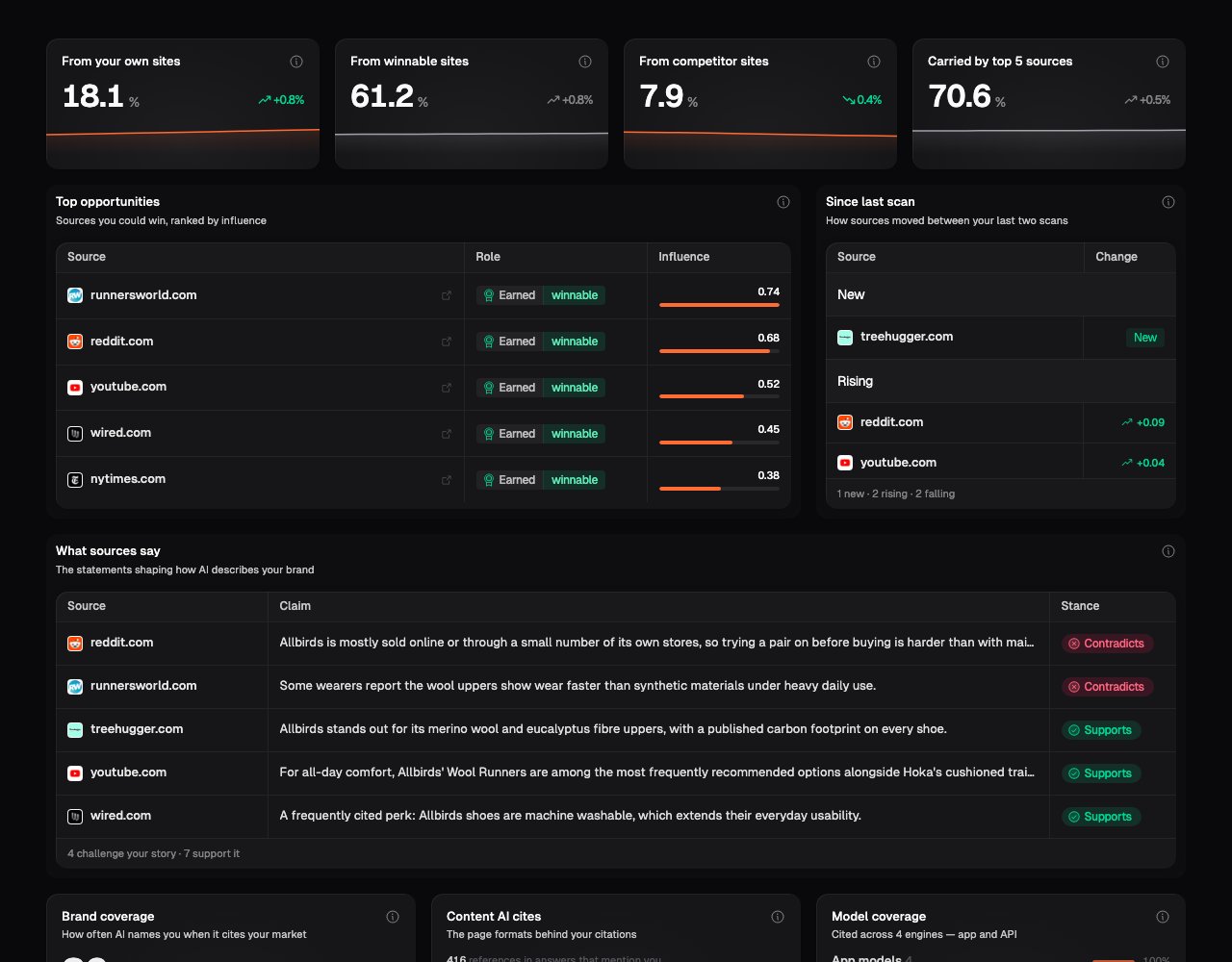
Some websites do far more than others to shape what AI says about your market. The four cards at the top of the page show where that influence sits:
* **From your own sites**: how much of it comes from pages you own and control.
* **From winnable sites**: how much comes from independent sites you don't own but could earn a place on, like review sites, news, and community forums.
* **From competitor sites**: how much comes from your competitors' own websites. You want this low. The less of it there is, the less of your market's story is being told from their pages.
* **Carried by top 5 sources**: how much of the whole picture rests on just five websites. When this is high, just a few sites are behind most of what AI says.
Each card also shows how it's moved since your last scan, so you can tell whether you're gaining ground or losing it.
This part of the page appears once a scan has fully analysed what each answer
said. You won't see it on older scans, or on a scan that's still processing.
## Where you can win, and what's moved
Two cards help you decide where to put your effort next.
**Top opportunities** lists independent websites that are already shaping AI's answers and that you could realistically earn a place on: think review sites, comparison articles, and community discussions. They're ranked with the highest-impact ones first, so start at the top. Each row shows the site, its role, and how much influence it carries.
**Since last scan** shows what's changed since your previous scan. A site that's brand new shows up as new, a rising site is gaining ground in AI's answers, and a falling one is losing it.
## What sources say about your brand
The **What sources say** card pulls out specific statements other sites are making about your brand, with the ones working against you listed first. Each row shows the website, the statement in AI's own words, and whether it **supports** the story you want told or **contradicts** it.
Select any row to see the source behind a statement, or open the full narrative view for more context.
## Coverage, formats, and models
Three cards give you the wider context behind your citations.
**Brand coverage** answers a simple question: when AI cites a website about your market, how often does it actually name your brand, rather than just link to a related page? Below the headline number, a list of **silent sources** shows sites that get cited a lot and never mention you. These are clear gaps to close: they're already part of the conversation about your market, and you're not in it.
**Content AI cites** shows the kinds of pages behind your citations, such as product pages, reviews, guides, and articles. It tells you what sort of content earns you a mention, so you know what's worth making more of.
**Model coverage** shows which AI assistants cite your market, split by how people reach them. Some people use AI through everyday chat apps like ChatGPT, and others use the same models through developer tools (labelled **app** and **API**). The split tells you where your citations actually land.
## The source inventory
Below the cards, the full inventory lists every website, one per row. Not every column shows on every scan: some need a bit of scan history or full analysis before Onsomble can work them out.
* **Source**: the website, with a link to open it
* **Role**: owned, earned, competitor, community, institutional, or reference
* **Format**: the kind of page AI cited most often on this site
* **Models**: which AI assistants used the site
* **Influence**: how strongly this site sways what AI says about brands in your market, on a scale of 0 to 100. It's based on the positive or negative things AI said while pointing to the site, so a higher score means it's doing more to steer opinion, good or bad
* **Reach**: how often the site turns up across the answers Onsomble collected, shown as both a percentage and a count
* **Cited**: how often AI linked to the site directly, rather than just leaning on it quietly
* **Pages**: how many separate pages on the site AI actually used
* **Claims backed**: how many specific statements in AI's answers this site stood behind
* **About you**: of the statements a site backed, how many were about your brand, split into positive, neutral, and negative
* **Competitors**: which of your competitors show up in the statements a site backs
* **vs last scan**: how the site's citations have moved since your last scan, with a small trend chart once you've run a few
Select any row to open its detail panel. There you'll see how the site's citations split across AI assistants, which kinds of pages it's cited for, and the individual pages AI used, right down to the exact statements AI made while citing each one.
See [Understanding metrics](/results/understanding-metrics#reference-measurements) for how Reach, Cited, Pages, Influence, and Brand coverage are worked out.
## What to look for
* **Your own pages that show up again and again.** Check they're current, accurate, and clear, because AI is leaning on them.
* **Sites in the Top opportunities list.** These already carry weight in AI's answers and don't belong to a competitor, so earning a place on them makes a real difference.
* **Sites rising in influence.** A site gaining ground is worth understanding before it settles into the picture AI gives your customers.
* **Silent sources with high reach.** These sites are part of the conversation about your market and never mention you. Read the answers to see whether you're genuinely being left out of coverage you should be in.
* **Statements that contradict your story.** Of everything on this page, these are the easiest to act on. You know exactly what's being said and exactly where it's coming from.
* **Competitor sites showing up in your important prompts.** Look at what the answers used those pages for before you decide whether a comparison or alternative page would help.
## What's next
Read sources in the context of each question and answer.
Compare the source picture with what AI assistants said about each brand.
Review suggested actions and the evidence behind them.
Compare sources by model, region, product, or prompt group.
Use this page to work out:
* which websites carry the most weight when AI talks about your market
* where you could earn more coverage, and where you're slipping
* what other sites are saying about your brand
* which pages, page types, and AI assistants matter most
## References and citations
Two words come up all over this page, and they mean slightly different things:
* A **reference** is any time a website shows up in an AI answer. Each page that shows up counts as one reference.
* A **citation** is a reference the AI assistant turned into a clickable link. So citations are the subset of references that AI linked to directly.
Say a page shows up in ten answers, and six of those included a link to it. That page has ten references and six citations.
AI assistants don't show their sources the same way every time. A low
reference count doesn't mean nothing off the web fed into the answer. It only
reflects the sources Onsomble could actually see in the answers it collected.
## Who your sources are
Every website on this page is sorted into a **role**, which tells you at a glance how it relates to your business:
* **Owned**: pages on your own website
* **Earned**: independent sites that write about you or your market, like review sites and publications
* **Competitor**: pages on a competitor's website
* **Community**: forums and social platforms where the public talks about your category, like Reddit or Quora
* **Institutional**: official sources, such as government, regulators, or consumer-advocacy groups
* **Reference**: encyclopaedia and general-reference sites, like Wikipedia
A role doesn't say whether a source is good or bad. It just tells you where that site sits in relation to you, and that's what guides your next move.
## Where your citations come from
Some websites do far more than others to shape what AI says about your market. The four cards at the top of the page show where that influence sits:
* **From your own sites**: how much of it comes from pages you own and control.
* **From winnable sites**: how much comes from independent sites you don't own but could earn a place on, like review sites, news, and community forums.
* **From competitor sites**: how much comes from your competitors' own websites. You want this low. The less of it there is, the less of your market's story is being told from their pages.
* **Carried by top 5 sources**: how much of the whole picture rests on just five websites. When this is high, just a few sites are behind most of what AI says.
Each card also shows how it's moved since your last scan, so you can tell whether you're gaining ground or losing it.
This part of the page appears once a scan has fully analysed what each answer
said. You won't see it on older scans, or on a scan that's still processing.
## Where you can win, and what's moved
Two cards help you decide where to put your effort next.
**Top opportunities** lists independent websites that are already shaping AI's answers and that you could realistically earn a place on: think review sites, comparison articles, and community discussions. They're ranked with the highest-impact ones first, so start at the top. Each row shows the site, its role, and how much influence it carries.
**Since last scan** shows what's changed since your previous scan. A site that's brand new shows up as new, a rising site is gaining ground in AI's answers, and a falling one is losing it.
## What sources say about your brand
The **What sources say** card pulls out specific statements other sites are making about your brand, with the ones working against you listed first. Each row shows the website, the statement in AI's own words, and whether it **supports** the story you want told or **contradicts** it.
Select any row to see the source behind a statement, or open the full narrative view for more context.
## Coverage, formats, and models
Three cards give you the wider context behind your citations.
**Brand coverage** answers a simple question: when AI cites a website about your market, how often does it actually name your brand, rather than just link to a related page? Below the headline number, a list of **silent sources** shows sites that get cited a lot and never mention you. These are clear gaps to close: they're already part of the conversation about your market, and you're not in it.
**Content AI cites** shows the kinds of pages behind your citations, such as product pages, reviews, guides, and articles. It tells you what sort of content earns you a mention, so you know what's worth making more of.
**Model coverage** shows which AI assistants cite your market, split by how people reach them. Some people use AI through everyday chat apps like ChatGPT, and others use the same models through developer tools (labelled **app** and **API**). The split tells you where your citations actually land.
## The source inventory
Below the cards, the full inventory lists every website, one per row. Not every column shows on every scan: some need a bit of scan history or full analysis before Onsomble can work them out.
* **Source**: the website, with a link to open it
* **Role**: owned, earned, competitor, community, institutional, or reference
* **Format**: the kind of page AI cited most often on this site
* **Models**: which AI assistants used the site
* **Influence**: how strongly this site sways what AI says about brands in your market, on a scale of 0 to 100. It's based on the positive or negative things AI said while pointing to the site, so a higher score means it's doing more to steer opinion, good or bad
* **Reach**: how often the site turns up across the answers Onsomble collected, shown as both a percentage and a count
* **Cited**: how often AI linked to the site directly, rather than just leaning on it quietly
* **Pages**: how many separate pages on the site AI actually used
* **Claims backed**: how many specific statements in AI's answers this site stood behind
* **About you**: of the statements a site backed, how many were about your brand, split into positive, neutral, and negative
* **Competitors**: which of your competitors show up in the statements a site backs
* **vs last scan**: how the site's citations have moved since your last scan, with a small trend chart once you've run a few
Select any row to open its detail panel. There you'll see how the site's citations split across AI assistants, which kinds of pages it's cited for, and the individual pages AI used, right down to the exact statements AI made while citing each one.
See [Understanding metrics](/results/understanding-metrics#reference-measurements) for how Reach, Cited, Pages, Influence, and Brand coverage are worked out.
## What to look for
* **Your own pages that show up again and again.** Check they're current, accurate, and clear, because AI is leaning on them.
* **Sites in the Top opportunities list.** These already carry weight in AI's answers and don't belong to a competitor, so earning a place on them makes a real difference.
* **Sites rising in influence.** A site gaining ground is worth understanding before it settles into the picture AI gives your customers.
* **Silent sources with high reach.** These sites are part of the conversation about your market and never mention you. Read the answers to see whether you're genuinely being left out of coverage you should be in.
* **Statements that contradict your story.** Of everything on this page, these are the easiest to act on. You know exactly what's being said and exactly where it's coming from.
* **Competitor sites showing up in your important prompts.** Look at what the answers used those pages for before you decide whether a comparison or alternative page would help.
## What's next
Read sources in the context of each question and answer.
Compare the source picture with what AI assistants said about each brand.
Review suggested actions and the evidence behind them.
Compare sources by model, region, product, or prompt group.