> ## Documentation Index
> Fetch the complete documentation index at: https://docs.onsomble.ai/llms.txt
> Use this file to discover all available pages before exploring further.
# Competitors
> Manage the competitors each scan measures your business against, including the ones AI models surface for you.
Competitors are the yardstick every scan measures against. Visibility, share of voice, and sentiment are all comparative; they're only meaningful alongside the businesses you're trying to beat.
The **Competitors** page lives under **Scan Settings** in the Site's sidebar. It has two parts: the competitors you're tracking, and the ones Onsomble has discovered for you.
 ## Competitor Management
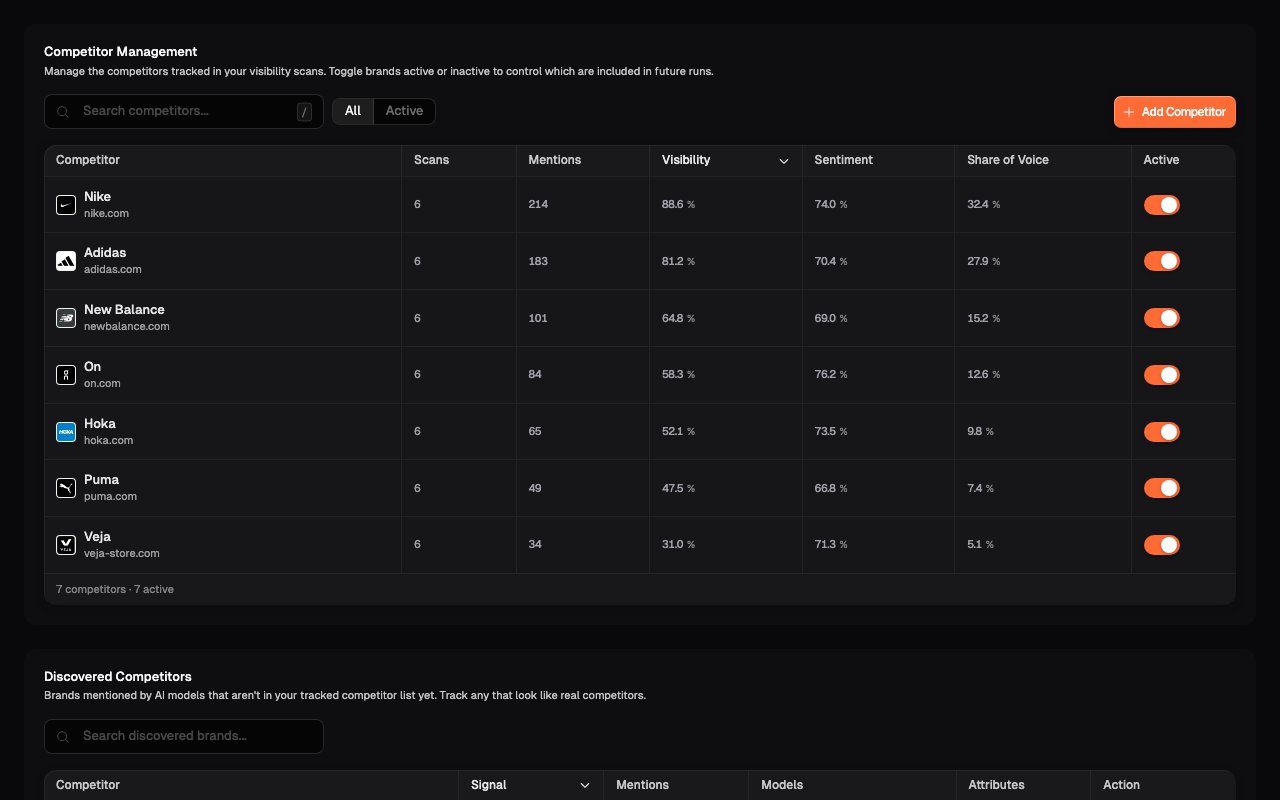
The tracked list shows every competitor your scans currently measure, with the numbers from your scan history alongside each one:
* **Visibility**: how often the competitor shows up in AI responses
* **Share of Voice**: how much of those answers they occupy
* **Sentiment**: the tone of how they're described
* **Mentions** and **Scans**: how much data sits behind those numbers
From here you can:
* **Add a competitor** by business name or domain (e.g. `Acme Corp` or `acme.com`)
* **Toggle a competitor active or inactive**: inactive competitors stay in the list but aren't measured in future scans
* **Search** the list once it grows
Your first competitor list is suggested during onboarding from your business profile. Treat it as a starting point, not a verdict:
* **Remove anyone who isn't a real competitor.** A business in the same broad category but a different market isn't a useful comparison.
* **Add anyone obvious that's missing.** Competitors who don't rank well in Google but still compete for customer attention often need to be added manually.
* **Keep the list tight.** Five to eight direct competitors produce clearer comparisons than twenty loosely-related ones.
If an agency is setting up for a client, confirm the competitor list with the
client before the first scan. Their sense of the competitive landscape is
usually more accurate than what any tool can infer.
## Discovered Competitors
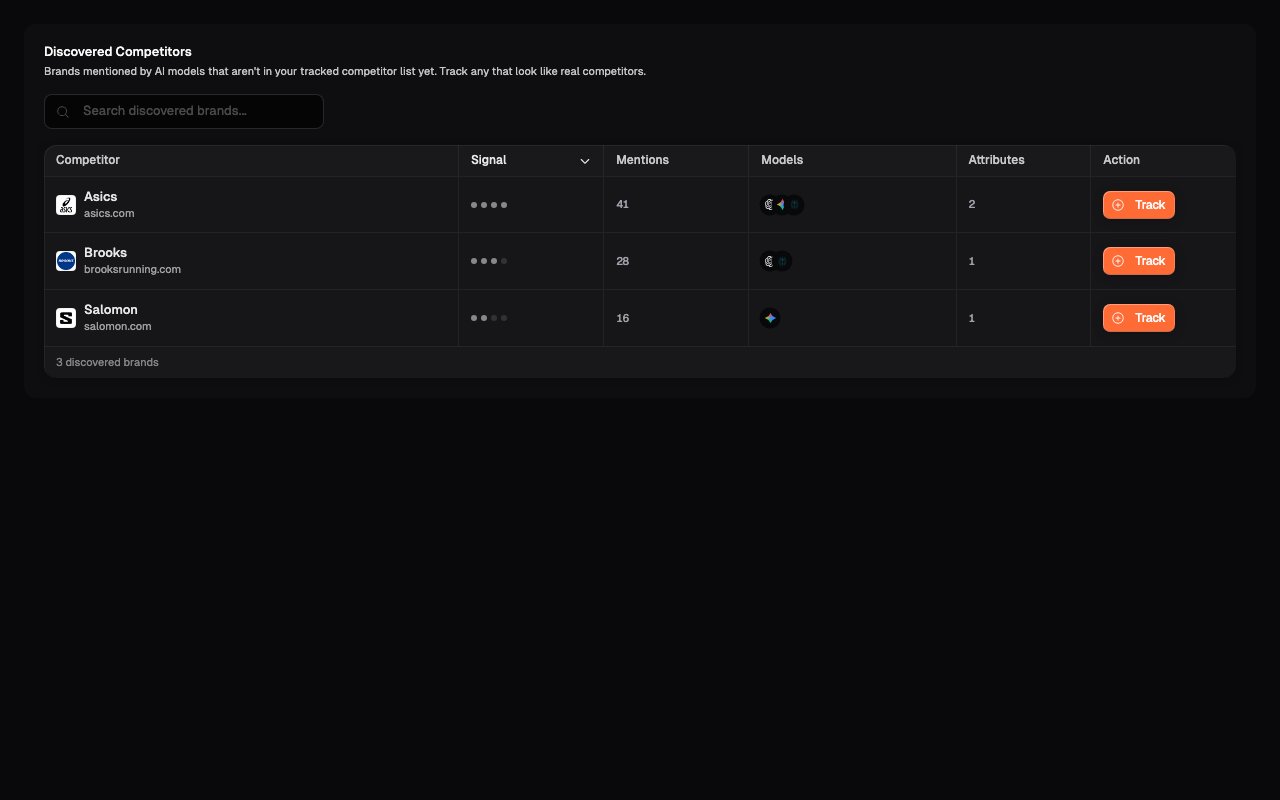
Scans regularly surface brands you didn't ask about. The **Discovered Competitors** table lists brands mentioned by AI models that aren't in your tracked list, with how often they came up (**Mentions**) and how strong the **Signal** is.
This is one of the more quietly useful views in the product: it's the market as AI assistants see it, not as you assume it is. If an unfamiliar name keeps appearing next to yours, that's a competitor in the eyes of the models. Click **Track** to promote it to your tracked list, and future scans will measure it properly.
## Competitor Management
The tracked list shows every competitor your scans currently measure, with the numbers from your scan history alongside each one:
* **Visibility**: how often the competitor shows up in AI responses
* **Share of Voice**: how much of those answers they occupy
* **Sentiment**: the tone of how they're described
* **Mentions** and **Scans**: how much data sits behind those numbers
From here you can:
* **Add a competitor** by business name or domain (e.g. `Acme Corp` or `acme.com`)
* **Toggle a competitor active or inactive**: inactive competitors stay in the list but aren't measured in future scans
* **Search** the list once it grows
Your first competitor list is suggested during onboarding from your business profile. Treat it as a starting point, not a verdict:
* **Remove anyone who isn't a real competitor.** A business in the same broad category but a different market isn't a useful comparison.
* **Add anyone obvious that's missing.** Competitors who don't rank well in Google but still compete for customer attention often need to be added manually.
* **Keep the list tight.** Five to eight direct competitors produce clearer comparisons than twenty loosely-related ones.
If an agency is setting up for a client, confirm the competitor list with the
client before the first scan. Their sense of the competitive landscape is
usually more accurate than what any tool can infer.
## Discovered Competitors
Scans regularly surface brands you didn't ask about. The **Discovered Competitors** table lists brands mentioned by AI models that aren't in your tracked list, with how often they came up (**Mentions**) and how strong the **Signal** is.
This is one of the more quietly useful views in the product: it's the market as AI assistants see it, not as you assume it is. If an unfamiliar name keeps appearing next to yours, that's a competitor in the eyes of the models. Click **Track** to promote it to your tracked list, and future scans will measure it properly.
 ## Changing competitors mid-history
Adding or removing competitors changes what future scans measure; past results are never rewritten. Trend views mark scan-configuration changes so you can tell a genuine market shift from a measurement change. See [Brand Scorecard](/results/brand-scorecard).
## What's next
The other half of scan relevance: the questions each scan asks.
Where the competitor comparison plays out over time.
## Changing competitors mid-history
Adding or removing competitors changes what future scans measure; past results are never rewritten. Trend views mark scan-configuration changes so you can tell a genuine market shift from a measurement change. See [Brand Scorecard](/results/brand-scorecard).
## What's next
The other half of scan relevance: the questions each scan asks.
Where the competitor comparison plays out over time.