

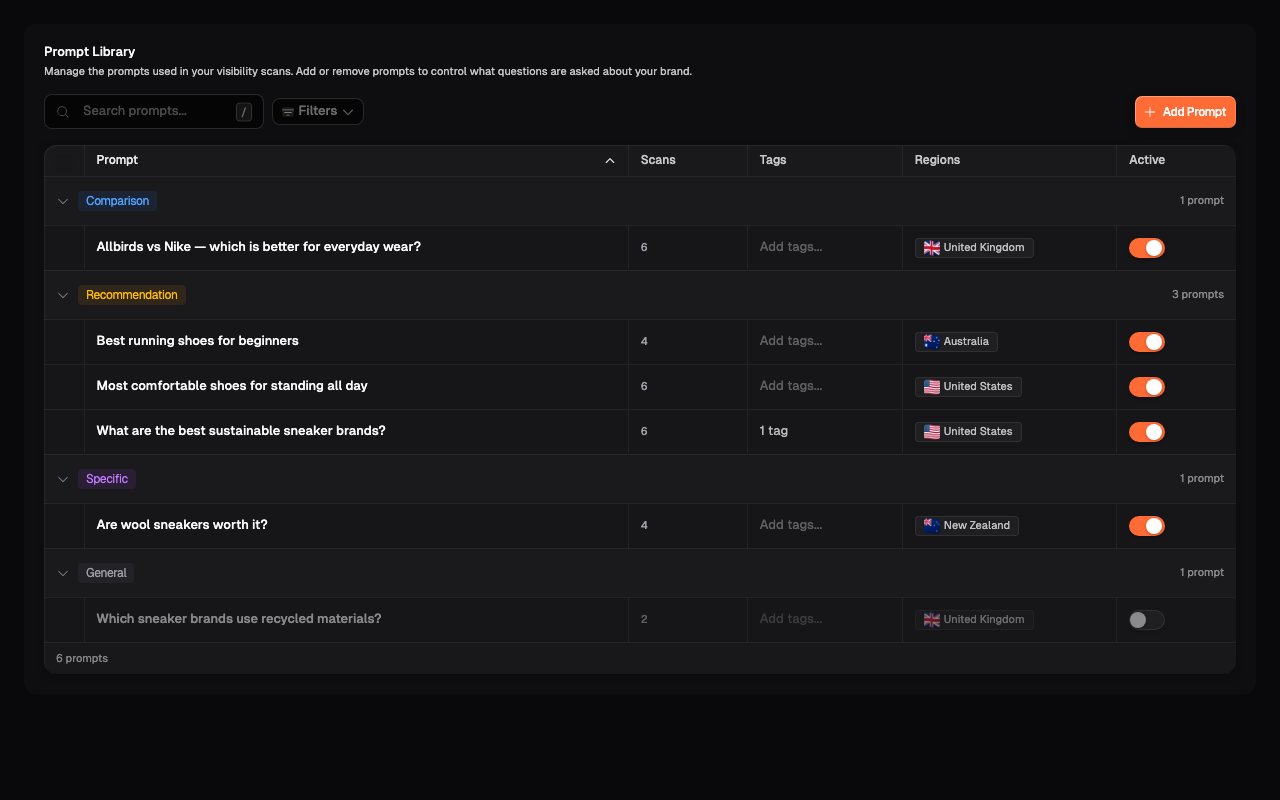
The library
Each prompt carries a set of attributes that the dashboards later use for filtering and breakdowns:- Category: the prompt type, used to group questions
- Product: the product or service the prompt is about
- Customer group: the target customer profile the prompt represents
- Journey stage: where in the buying journey the question sits
- Region: the market the prompt is asked from
- Status: active prompts run in scans; inactive ones are kept but skipped
- Tags: your own labels, for whatever slicing matters to you
Attributes aren’t decoration. They’re what powers dashboard
filtering and the per-prompt breakdowns in
Prompt Results. A well-attributed library makes
every insights page sharper.
The prompt strategy wizard
Rather than writing prompts one at a time, the prompt strategy wizard generates a coherent set from your business profile: the products you track, your customer personas, the journey stages you care about, and the regions you operate in. It’s also the natural way to expand coverage later — a new product line or a new market is a strategy change, and regenerating beats hand-writing twenty prompts. See How prompt generation works for exactly what each input does, how many prompts you end up with, and how categories get assigned.Writing good prompts by hand
When you do add prompts manually, three qualities matter:- Realistic phrasing. Write the way a customer would type or speak. “What’s the best insurance broker in Christchurch” works better than “optimal insurance intermediary Christchurch metropolitan region.”
- Customer intent. Focus on the moment a customer is deciding (comparisons, recommendations, “best X for Y”) rather than pure information queries.
- Variety. Mix brand-agnostic (“best plumber in…”), category-specific (“plumbers who handle commercial work”), and problem-specific (“my hot water cylinder is leaking: who do I call”) prompts.
Changing prompts mid-history
Like competitors, prompt changes apply from the next scan onwards; history is preserved and trend views mark configuration changes. Prefer deactivating a prompt over deleting it, so the history attached to it stays interpretable.What’s next
How prompt generation works
The strategy behind a generated prompt set, in detail.
Prompt Results
Where you see how each prompt performed.